Introduction
Small businesses are rapidly adopting AI chatbots to improve customer service and streamline operations, but common implementation mistakes can threaten data security, customer trust, and business outcomes. Understanding these AI chatbot implementation mistakes is crucial for anyone managing or considering chatbot deployment on a small business website. This guide addresses the most frequent errors—such as exposing sensitive data, poor integration, and lack of escalation paths—that can undermine your investment and reputation.
By reading this article, you will learn how to spot and avoid critical issues like uploading confidential business data without reviewing privacy controls, failing to maintain data quality for chatbot training, and neglecting to configure access permissions, as highlighted by industry experts (Bitdefender, DCR Inc.). You’ll also see how over-automation and missing escalation paths frustrate users and erode trust (Forbes).
Many small businesses underestimate the complexity involved in chatbot deployment—misjudging the importance of continuous monitoring, regular updates, and clear communication with customers about chatbot capabilities and limitations. Without a proactive approach, issues like ambiguous responses, inconsistent user experiences, or difficulty in handling edge cases can quickly surface. This can result in lost sales opportunities, negative brand perception, and potential compliance risks, especially as regulations around data privacy and AI transparency evolve. Recognizing these challenges early helps ensure your chatbot serves as a reliable extension of your team rather than a liability.
This guide goes beyond generic advice by mapping each mistake to its business impact and recommended remedy, integrating insights from the NIST AI Risk Management Framework. You’ll gain practical checklists, myth-busting facts, and real-world decision frameworks tailored for small business website environments—empowering you to deploy chatbots confidently, maximize ROI, and protect your customers and company from avoidable risks.

Defining AI Chatbot Implementation in Small Business Contexts
The video Most Small Businesses Are Using AI Wrong highlights that many small businesses misunderstand or misuse AI chatbots, which can lead to inefficient implementation.
Optimizing your site for local customers is often critical; the Local SEO for WordPress Websites guide provides relevant steps that complement chatbot deployment.
What Does “AI Chatbot Implementation” Mean for Small Businesses?
For small businesses, AI chatbot implementation refers to the complete process of selecting, configuring, deploying, and maintaining AI-driven conversational agents on their websites. Unlike large enterprises with dedicated IT teams, small businesses often approach this as a project managed by owners, managers, or a single digital consultant. The process involves:
- Choosing an AI chatbot platform that fits operational needs and budget.
- Setting up the chatbot to address specific tasks, such as answering FAQs, capturing leads, or providing basic support.
- Integrating the chatbot with existing systems (e.g., CRM, email, or booking software).
- Continuously monitoring performance and updating the chatbot to reflect changes in services or customer expectations.
AI Chatbots vs. Scripted Bots: Key Differences
It is important to distinguish between AI chatbots and traditional scripted bots. Scripted bots operate on pre-defined rules and decision trees—responding only to exact keywords or options. AI chatbots, by contrast, use natural language processing and can interpret a wider range of customer questions, learn from interactions, and provide more flexible responses. This flexibility introduces both opportunities and risks: AI chatbots can improve user satisfaction but may also generate unexpected or inaccurate answers if not properly configured and supervised (source).
Unique Small Business Considerations
Resource Constraints
Small businesses often lack dedicated IT or data science resources, which can lead to AI chatbot setup issues such as incomplete training, weak integration with business systems, or reliance on default configurations. Limited budgets mean that choices around chatbot platforms, support, and maintenance must be carefully weighed to avoid hidden costs or operational disruption.
Need for Rapid Return on Investment (ROI)
Unlike large organizations, small businesses typically require fast, measurable results from technology investments. Chatbot deployment must deliver clear value—such as reducing manual workload, increasing lead capture, or improving response times—within a short time frame. Overly complex or poorly targeted chatbots can quickly become a drain on resources rather than an asset (source).
Data Privacy and Security
Uploading or sharing sensitive business or customer data with an AI chatbot can create new risks. Small businesses must actively review privacy settings, connected applications, and data retention practices to prevent exposure of confidential information (source). Misunderstanding how data flows between chatbot providers, website hosts, and third-party integrations can lead to accidental data leaks. The NIST AI Risk Management Framework provides structured guidance for managing these risks, emphasizing the importance of clear roles and responsibilities among controller, processor, and technology provider.
Scoping AI Chatbot Projects for Small Business Needs
For small firms, the scope of AI chatbot implementation should be clearly defined and limited to high-impact use cases. Over-automation—where the chatbot replaces too many human interactions—can harm customer relationships and trust (source). A practical approach involves mapping chatbot capabilities to real business processes, setting clear escalation paths to human agents, and ensuring the bot is regularly updated based on actual customer feedback and support trends.
Summary Table: AI Chatbot Implementation Tasks vs. Small Business Constraints
| Implementation Step | Common Constraint | Risk if Neglected |
|---|---|---|
| Platform Selection | Budget, technical expertise | Incompatible or costly solution |
| Configuration & Training | Limited time, data quality | AI chatbot errors and bias |
| Integration | Few IT resources | Broken workflows, data exposure |
| Performance Monitoring | Ongoing attention required | Outdated or unhelpful responses |
| Privacy Control | Lack of compliance experience | Customer data leaks |
In summary, implementing an AI chatbot in a small business setting is not just a technical task—it requires deliberate choices, risk management, and ongoing oversight tailored to the realities of small teams, limited budgets, and the high stakes of customer trust.
Comparison Table: Common Mistakes, Impacts, and Solutions
To explore practical uses and workflows, review these AI automation examples for small businesses.
How Major AI Chatbot Implementation Mistakes Affect Small Businesses
Evidence from recent industry analysis (Bitdefender, DCR Inc., HRP.net) confirms that specific AI chatbot deployment mistakes expose small businesses to customer loss, data security risks, and regulatory scrutiny. The table below maps each critical error to its business impact and practical, actionable solution. Use this as a reference to audit, prioritize, and remediate your own chatbot setup.
| Mistake | Business Impact | Recommended Solution |
|---|---|---|
| Poor Training Data (Outdated, Biased, or Incomplete) | Inaccurate or biased responses damage trust; misinformation can frustrate or mislead customers (HRP.net) | Improve data quality. Use recent, representative, and unbiased datasets. Validate chatbot responses regularly. |
| No Defined Escalation Path to Human Support | Customer frustration when the bot cannot resolve complex issues; lost sales or loyalty (DCR Inc.) | Set up clear escalation triggers. Integrate a seamless handoff to a human agent for unresolved queries. |
| Weak Privacy Controls / Data Upload Risks | Exposure of confidential business or customer data; risk of data breach and regulatory non-compliance (Bitdefender) | Review and enforce privacy settings. Remove sensitive data before uploading. Audit connected apps and permissions regularly. |
| Over-Automation (No Human Touch in Critical Flows) | Damaged customer relationships; reduced satisfaction for nuanced or high-value interactions (DCR Inc.) | Balance automation with human support. Reserve human intervention for complex or sensitive scenarios. |
| Lack of Ongoing Monitoring and Updates | Chatbot becomes outdated or fails to adapt to changing customer needs, causing rising support errors | Schedule regular performance reviews. Monitor logs for errors. Update chatbot training and workflows as needed. |
| Improper Access Permissions & Unreviewed Integrations | Unintended data exposure via third-party apps; unauthorized access to sensitive information (Bitdefender) | Limit chatbot permissions to the minimum necessary. Regularly review integrated apps and access logs. |
| Insufficient AI Expertise or Unrealistic Expectations | Misconfiguration, poor system integration, or disappointment with chatbot performance | Invest in basic AI training for staff. Use vendor support, or consult third-party experts for setup and integration. |
| Assuming Data Deletion Is Universal | Residual sensitive data may remain in connected apps, risking privacy or compliance failures | Understand each provider’s deletion process. Verify removal from all integrated systems, not just the chatbot interface. |
| Using Personal Accounts for Chatbot Management | Blurs lines between business and personal data; increases risk of accidental data exposure | Always use dedicated business accounts for chatbot setup, data access, and administration. |
| Poor Business System Integration & Process Gaps | Broken workflows, missed leads, or incomplete customer records (DCR Inc.) | Map chatbot flows to existing business processes. Test integration points and document handoffs clearly. |
Using the Table: Small Business Decision Framework
To avoid the most damaging AI chatbot implementation mistakes small business websites face, prioritize security and customer experience first. Quickly audit your chatbot for sensitive data exposure, escalation paths, and integration gaps. Reference the NIST AI Risk Management Framework for additional guidance on risk controls, and for practical automation strategies, see our in-depth guide on AI automation examples for small businesses.
It’s important to recognize that AI chatbot errors often stem from a lack of planning and insufficient understanding of both technical and customer-facing requirements. For example, failing to define chatbot objectives or neglecting user feedback can result in systems that don’t align with real business needs. Regularly soliciting customer input, performing scenario-based testing, and involving stakeholders from different departments can help small businesses close these gaps. Additionally, small businesses should avoid a “set-and-forget” mentality: AI chatbots require ongoing oversight to adapt to evolving regulations, customer expectations, and new security threats. Even after initial deployment, monitoring chatbot analytics—such as user satisfaction, error rates, and handoff frequency—can illuminate hidden issues and opportunities for improvement. By integrating these review practices with the solutions in the table above, businesses can foster a more reliable, secure, and effective chatbot presence.
Checklist: Actionable Steps to Avoid Chatbot Mistakes
For guidance on optimizing your chatbot’s SEO metadata, consult the AI prompts for meta titles and descriptions.
If you need actionable AI prompts for website copywriting to improve chatbot responses and overall site messaging, refer to the guide on AI prompts for website copywriting.
For integrating smarter AI solutions for business, see the detailed guide on AI solutions for business.
Small business owners can significantly reduce AI chatbot implementation mistakes by following a prioritized, evidence-backed checklist. Each step below addresses a specific risk, with practical details to ensure safe and effective chatbot deployment on your website.
-
Audit and Cleanse Training Data
Before deploying any AI chatbot, systematically review all training data—especially documents, FAQs, support transcripts, and product details. Eliminate outdated, incorrect, or irrelevant entries. According to Bitdefender (source), including sensitive or confidential information in training sets risks data leaks through chatbot conversations. Assign responsibility for data quality to a staff member with both business context and basic data handling skills. Use versioning to track changes and ensure you can roll back errors, especially after major business updates.
-
Set Up Clear Escalation Paths to Human Support
Configure your chatbot to detect unresolved or complex user issues and escalate to a real person. This reduces frustration and protects customer trust, as highlighted by HRP (source). Build escalation rules based on keywords, sentiment, or repeated failed answers. Ensure the chatbot can transfer context (such as conversation transcripts) to the support team, so customers avoid repeating themselves. Document the escalation workflow for staff, and test it before launch.
-
Enable and Regularly Review Privacy and Access Controls
Activate all available privacy settings and restrict third-party integrations to only those needed. Bitdefender warns that neglecting privacy and access reviews can expose business data to unintended parties (source). Schedule quarterly audits of chatbot permissions, connected apps, and log access to identify changes or anomalies. Treat chatbot data retention and deletion policies separately from other business systems, since deleting data in one place often does not remove it everywhere. Limit which staff can grant or modify chatbot access.
-
Restrict Use of Personal Accounts for Chatbot Management
Never manage business chatbots through personal email or cloud accounts. Mixing personal and business credentials can compromise both sets of data if an account is breached. DCR (source) advises creating dedicated business accounts with strong authentication and role-based access control. Document who has access for transparency and accountability, and promptly remove permissions for staff who leave or change roles.
-
Integrate Chatbot Workflows with Existing Business Systems
Connect your chatbot to relevant business tools—such as your CRM, support inbox, or booking system—using supported, secure methods. Poor integration is a frequent cause of small business chatbot problems (DCR). Map out the customer journey and decide exactly when the chatbot should hand off to a human or trigger actions in other systems. Test all integrations in a non-production environment before going live. Keep a record of all connected apps and APIs to simplify troubleshooting and future upgrades. For practical integration approaches, see Automation & AI.
-
Schedule Regular Chatbot Performance Reviews and Updates
Evaluate chatbot accuracy, helpfulness, and user satisfaction at fixed intervals—at least every quarter, or more often after business changes. Update training data, escalation triggers, and response templates as needed. Do not rely on a “set it and forget it” approach. According to DCR, ongoing monitoring is essential to catch outdated information and new types of errors. Use analytics to identify common failure points, and involve staff in reviewing transcripts or flagged conversations to continuously improve quality.
-
Educate Staff on Safe AI Usage and Data Sharing
Train everyone who interacts with the chatbot or its data—managers, support staff, and admins—on privacy, security, and appropriate data sharing practices. Refer to NIST’s AI Risk Management Framework (source) for foundational policies suitable for small businesses. Emphasize that uploading sensitive business or customer information can have irreversible consequences if mishandled. Foster a culture of reporting suspected errors or privacy issues promptly.
Final Tip
Assign responsibility for each step to a named staff member, and track progress with a simple checklist. This ensures accountability and reduces the chance of critical oversights during AI chatbot deployment.
Myth Versus Fact: AI Chatbot Implementation in SMBs
Myth 1: “AI chatbots can replace all human customer service.”
This belief is common, but the reality is more nuanced. While AI chatbots can handle straightforward requests, they are not suited for every customer interaction—especially those involving emotion, nuance, or complex problem-solving. According to Forbes, over-automation frequently backfires for small businesses. When a customer faces a unique or sensitive issue, a chatbot lacking escalation procedures can lead to frustration, damaged trust, or lost business.
Furthermore, chatbots often struggle with context, slang, or ambiguous questions, making them less effective in situations that demand empathy or creative problem-solving. The inability to interpret subtle cues can result in generic or off-topic responses, which may leave customers feeling undervalued. While AI technology continues to advance, small businesses risk alienating customers if they rely on chatbots alone for support, especially in industries where personal touch is a competitive advantage. Successful SMBs recognize the importance of blending automation with authentic human interaction to deliver a seamless customer experience.
Implementation Detail: Human Escalation is Essential
Small businesses should design their chatbot workflows to automatically escalate unresolved or sensitive conversations to a human agent. This can involve keyword-based triggers (e.g., “complaint” or “refund”), sentiment analysis, or a simple “talk to human” command. Regular reviews of chatbot transcripts help refine escalation logic. The absence of these mechanisms is a leading cause of negative customer experiences, as noted in industry reporting.
Myth 2: “Deleting chatbot conversations removes all business data.”
This assumption creates a false sense of security. Deleting a conversation from a chatbot interface does not guarantee that all associated business data is erased from back-end systems or third-party integrations. Bitdefender warns that data may persist in logs, caches, or connected applications even after a user-facing deletion. Relying solely on the chatbot’s delete function can leave sensitive information exposed.
Implementation Detail: Conduct Regular Privacy Reviews
SMBs must audit where chatbot data is stored, processed, and shared. This includes reviewing the retention policies of both the chatbot provider and any connected apps. Privacy reviews should verify that deletion requests are propagated across all relevant systems. Where applicable, businesses should document data flows and confirm compliance with local data protection regulations. This reduces the risk of accidental disclosures or regulatory violations.
Myth 3: “Any employee can safely deploy and manage chatbots.”
While many chatbot platforms advertise ease of use, delegating deployment and management to untrained staff can create security and compliance gaps. Bitdefender highlights that uncoordinated deployments increase the risk of exposing confidential data, misconfiguring permissions, or failing to monitor integrations. Even minor oversights can result in business-critical data being shared with unauthorized parties.
Implementation Detail: Centralize Oversight and Assign Roles
Small businesses should appoint a responsible individual or a small, trained team to oversee chatbot deployment. This team should have a clear understanding of data privacy, access controls, and integration risks. Centralizing oversight reduces the likelihood of “shadow IT” deployments and ensures that security and compliance checks are consistently applied. Documenting who has administrative access and regularly auditing permissions are practical steps to maintain control.
Summary Table: Myths Versus Facts in SMB Chatbot Deployment
| Myth | Fact | Practical Action | Evidence Source |
|---|---|---|---|
| Chatbots can fully replace humans | Over-automation harms relationships; escalation is needed | Map escalation paths and monitor unresolved cases | Forbes |
| Deleting chats removes all stored data | Data may persist in back-end systems | Audit data storage and confirm deletion policies | Bitdefender |
| Any employee can deploy/manage chatbots safely | Uncoordinated deployment increases risk | Centralize deployment roles; require training | Bitdefender |
Beyond the Myths: Building a Responsible AI Chatbot Program
Moving past these myths, small business leaders should recognize that responsible AI chatbot implementation is an ongoing process, not a one-time setup. Coordinated deployment, regular privacy reviews, and human oversight are not just technical best practices—they are essential to protect customer trust and business reputation. Consulting sector-specific compliance guidelines and using frameworks like the NIST AI Risk Management Framework can further strengthen your approach.
Visual Summary: AI Chatbot Mistakes and Prevention
Infographic-Style Map: Critical Mistakes and Solutions
| Mistake | Risk Point | Best-Practice Solution |
|---|---|---|
| Uploading sensitive business data | Data input to AI chatbot | Audit uploads; enforce privacy settings; restrict file access (Bitdefender) |
| Poor training data quality | Training set creation | Curate and validate data; remove bias; periodic retraining (DCR) |
| No human escalation path | User request exceeds chatbot scope | Define clear escalation triggers; route to human agent when needed (HRP) |
| Over-automation of critical touchpoints | Customer support and complaints | Limit automation for sensitive issues; preserve human interaction (Forbes) |
| Unreviewed access permissions | Integration with apps or CRM | Regularly audit permissions and integrations; apply least-privilege rules |
| Insufficient AI expertise | Initial configuration and ongoing setup | Engage qualified staff or consultants; implement training and knowledge transfer (DCR) |
| Failure to monitor chatbot performance | Live deployment | Set up usage analytics, review logs, update content and rules regularly |
| Assuming deleted data is fully erased | Post-chat or user data deletion | Confirm deletion across all connected systems; document retention policy |
| Using personal accounts for management | Admin login and chatbot control | Separate business and personal accounts; restrict admin roles |
| Integration issues with business systems | Data flow between chatbot and CRM, ticketing, or email | Map data flows visually; test integrations before launch; monitor for sync errors |
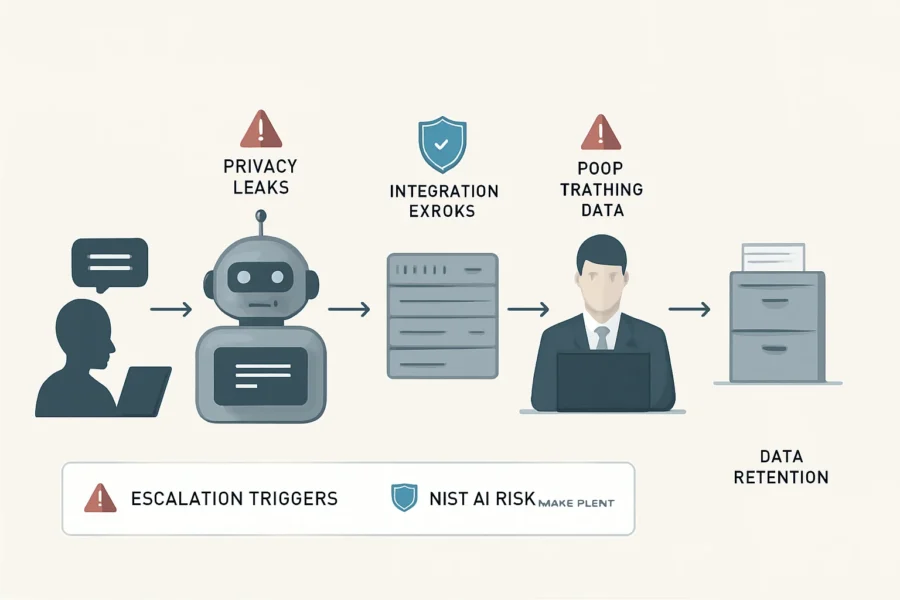
Visualizing Data Flow and Risk Points
- Input: Customer asks question or uploads file → Privacy checkpoint: Automated filters block sensitive data uploads.
- Processing: AI chatbot interprets input using training data → Risk: Inaccurate or biased responses if data not validated.
- Integration: Bot fetches information from CRM, knowledge base, or apps → Risk: Unauthorized access if permissions poorly configured.
- Output: Chatbot returns answer or action → Escalation path: If issue unresolved, auto-escalate to human agent.
- Data retention: Conversation and user data stored → Privacy checkpoint: Confirm policies and deletion procedures.
For small business owners, visualizing these data flows is essential to pinpointing where security or operational gaps may occur. A practical approach is to create a diagram that illustrates each stage of interaction, highlighting where data enters the system, how information is processed, and when it leaves or is stored. Marking risk points and privacy checkpoints in distinct colors helps teams quickly identify areas that require extra attention or regular monitoring. This level of visualization supports both technical and non-technical stakeholders in understanding how the chatbot fits within broader business processes. It can also serve as a communication tool during onboarding or compliance reviews, ensuring everyone knows their role in maintaining chatbot integrity.
Highlighting Escalation and Privacy Checkpoints
- Escalation triggers: Define keywords, sentiment, or topic boundaries that signal the need for human support.
- Human handoff protocol: Route chat transcript and context to the assigned staff member; notify user of the transition.
- Privacy checkpoints: Insert checks at data entry, integration, and retention stages. Use automated filters to block uploads containing personal or financial details, as recommended by Bitdefender.
- Audit trail: Maintain logs of all chatbot actions, escalations, and admin changes for accountability.
- Apply NIST AI Risk Management Framework: Document risk impact, mitigation steps, and review intervals at each key process point (NIST).
Establishing clearly defined escalation and privacy checkpoints not only reduces potential errors but also builds customer trust. Small businesses should regularly review and update their escalation protocols to adapt to changing customer needs or regulatory requirements. Additionally, integrating automated alerts for privacy breaches or failed escalations can help catch issues before they become serious problems. By documenting these procedures and aligning them with recognized frameworks, such as NIST’s AI Risk Management Framework, businesses demonstrate a proactive stance on both operational excellence and data protection.
Practical Visualization Tips for Small Businesses
- Draw a flowchart connecting user input, chatbot logic, integrations, escalation, and data retention. Mark risk points in red and privacy checkpoints in blue.
- Assign escalation ownership to named staff, not generic roles.
- Schedule quarterly risk reviews using checklists aligned with NIST AI guidance.
- Use simple icons or color coding in your diagrams to make risk areas and checkpoints immediately visible, even to staff without technical backgrounds.
- Include a legend or key explaining symbols and color codes so everyone understands the visualization.
- Update your diagrams as your chatbot or integrations change, ensuring ongoing accuracy and value for training or compliance.
- Consider digital tools (such as Lucidchart or Miro) to enable easy sharing and collaborative updates among your team.
For more AI automation ideas, see 30 AI automation examples for small businesses.
Illustrative Scenario: Avoiding a Data Privacy Breach with AI Chatbots
Scenario Overview: A Local Retailer Plans AI Chatbot Integration
Imagine “GreenSpace Florals,” a small urban flower shop with an online store and regular local customers. The owner, Emma, wants to install an AI chatbot to answer common questions about delivery times, bouquet options, and care instructions on the business website. She believes this will save time and improve customer service, especially during peak holidays.
Emma researches various chatbot providers and selects a platform that promises easy setup and seamless integration with her existing digital tools. Her primary goal is to automate repetitive inquiries, freeing up staff to focus on in-store customers and complex orders. Since her customer base values quick responses, Emma expects the chatbot to enhance overall satisfaction and efficiency.
Near-Miss: How Simple Oversight Almost Led to Data Exposure
Emma signs up for a popular AI chatbot platform. During setup, she uploads a spreadsheet with recent customer orders, hoping the bot can reference purchase history and personalize responses. She leaves most privacy settings at their defaults and quickly enables integrations with her email marketing tool and CRM, assuming these will streamline communications.
Within hours, the chatbot is live. However, Emma soon notices that the bot, when asked about “order issues,” sometimes reveals full names and delivery addresses from the uploaded spreadsheet in its responses. Fortunately, this is caught during an internal test run before real customers interact with the bot.
This mirrors documented business risks: uploading confidential data and failing to review privacy controls can inadvertently expose sensitive customer information to public web users or unauthorized staff, as highlighted by Bitdefender’s analysis of AI chatbot business data mistakes.
This near-miss highlights how easily privacy can be compromised through everyday actions, especially for small businesses without dedicated IT staff. Without thorough oversight, automated systems may inadvertently surface private data in customer chats, putting both the business and its clients at risk of exposure or even regulatory penalties. The incident underlines the importance of understanding what data is fed into AI tools and recognizing that default configurations may not offer adequate protection.
Checklist in Action: How Proactive Measures Prevented a Breach
Emma recalls the AI chatbot implementation checklist from her research. She decides to:
- Audit Uploaded Data: Emma immediately removes the customer spreadsheet, replacing it with only product descriptions and generic FAQs. She ensures no personally identifiable information (PII) remains in chatbot training data.
- Review Privacy Controls: She carefully checks the AI platform’s data retention settings, disables unnecessary integrations, and restricts the bot’s access to only public shop information. Permissions are updated so only senior staff can manage chatbot data.
- Set Up an Escalation Path: Emma configures the chatbot to offer a “talk to a human” option whenever a query involves order status or account-sensitive issues. These are routed directly to her team’s secure helpdesk, ensuring no private information is handled by the AI unattended.
- Implement Regular Monitoring: She schedules monthly audits of chatbot logs and privacy settings, looking for any signs of unintended data access, and checks that all content remains current and non-sensitive.
- Train Staff Appropriately: Emma provides a short session for her team, showing how to handle data uploads, escalation triggers, and privacy controls, so no one accidentally repeats the original mistake.
Beyond these steps, Emma documents her process for future reference and makes sure her vendors are aware of her privacy expectations. She also sets up notifications for unusual chatbot behavior, such as repeated access to sensitive content, which allows her to respond quickly if issues arise. This ongoing vigilance ensures that GreenSpace Florals’ chatbot remains a helpful tool rather than a liability.
Outcome: Risk Averted, Trust Preserved
Because Emma caught the risk before the chatbot went public—and because she followed a structured review process—no customer data was exposed. The experience highlights how a small business, even with limited resources, can avoid serious AI chatbot implementation mistakes that would otherwise harm customer trust and potentially create legal or reputational fallout.
This scenario illustrates a core principle from the NIST AI Risk Management Framework: proactive risk identification and control are essential for safe AI deployment, regardless of business size or technical expertise.
For small businesses, the lesson is clear: never rely on default settings, always review data inputs and permissions, and ensure that escalation to a human is possible whenever sensitive or complex queries arise. Even in environments with limited IT support, applying a clear privacy and escalation checklist can prevent the most damaging AI chatbot errors.

Key Takeaways for Small Business Chatbot Success
Data Quality and Privacy: A Continuous Commitment
Small businesses must approach AI chatbot implementation with ongoing vigilance over data quality and privacy. Verified industry guidance stresses that uploading confidential business or customer data to an AI chatbot without first auditing for sensitive content or properly configuring privacy controls can expose information to unauthorized parties (Bitdefender). This includes reviewing privacy settings and any connected third-party applications before deployment and whenever integrations change. Data quality is equally critical: chatbots trained on incomplete, outdated, or biased datasets generate unreliable responses, eroding customer trust and introducing reputational risks (DCR Inc.).
To further strengthen privacy, businesses should implement clear policies on what data is permissible for chatbot access, limit data retention to only what is strictly necessary, and regularly review logs for any unusual access or sharing activity. It’s also advisable to clearly communicate privacy practices to customers, helping build trust and ensuring compliance with relevant regulations. Periodic re-evaluation of chatbot training data can help ensure responses remain accurate and free from unintended bias, supporting both ethical standards and business reputation. Additionally, integrating chatbot privacy controls with existing IT security protocols—such as regular password updates and multi-factor authentication—can reduce the risk of unauthorized access or data leaks.
Mandatory Human Escalation in Chatbot Workflows
Each AI chatbot workflow must include a clear, immediate path for users to reach a human agent when needed. Industry evidence demonstrates that failing to provide this option frustrates customers, increases complaint rates, and can lead to lost business (HRP.net). The escalation process should be visible, simple to trigger, and avoid placing users in endless loops or dead-ends. Regularly test escalation triggers and ensure support staff are prepared to handle hand-offs from the chatbot.
Best practice is to make the option to speak with a human readily accessible at any point in the conversation, not just after repeated failed responses. Escalation pathways should include clear language cues (such as “talk to an agent”) and backup options, like providing a phone number or email contact in case of technical issues. Training support staff to understand the context and history of chatbot interactions ensures smoother customer transitions and faster issue resolution. Documenting and periodically reviewing escalation outcomes can reveal workflow gaps, enabling continuous process improvement.
Performance Monitoring and Staff Education: Active, Not Passive
AI chatbot errors often stem from misconfiguration, outdated responses, or lack of staff familiarity with the system. Small businesses should establish a routine schedule for monitoring chatbot logs, reviewing conversation transcripts, and running test queries targeting known problem areas. Evidence suggests that most costly errors are preventable through periodic reviews and basic staff training on the chatbot’s capabilities and limitations (DCR Inc.). Ensure that responsibility for these tasks is assigned and that staff can update or flag problematic chatbot behaviors swiftly.
Staff education should extend beyond initial onboarding to include refresher sessions, especially when chatbot features or underlying data sources change. Encourage team members to report unusual chatbot behavior or customer feedback promptly, creating a culture of shared responsibility. Use performance dashboards, if available, to track key metrics such as response accuracy, resolution rates, and user satisfaction over time. Proactive monitoring not only prevents issues but also provides insights into evolving customer needs, which can inform future chatbot updates.
Simplicity and Security Over Novelty
For most small businesses, prioritizing a secure, user-friendly chatbot experience is more valuable than adopting every new AI feature. Over-automation—such as using AI to handle all customer communications or connect to every available data source—can undermine customer relationships and increase risk (DCR Inc.). Rely on features that directly improve customer experience, such as clear language, fast response times, and reliable escalation. Minimize data integrations and keep permissions restrictive unless a clear business case supports expansion.
When evaluating new chatbot features, consider their impact on operational complexity and security posture. Focus on incremental improvements that enhance usability or efficiency, rather than adopting unproven technologies for novelty’s sake. Secure configuration—such as restricting access to sensitive functions and regularly updating permissions—should be revisited after any major system change. Documenting rationale for each integration or feature addition ensures changes align with business objectives and risk tolerance, making it easier to scale or adapt as needs evolve.
Decision Criteria for Sustainable Chatbot Success
- Pre-deployment: Audit data for sensitivity, review privacy and access controls, and verify training data quality.
- Integration: Limit connected applications to only those essential for the chatbot’s function. Review permissions after any system change.
- Escalation: Map all chatbot flows to a human fallback; test this regularly from the user’s perspective.
- Monitoring: Schedule routine reviews of performance logs, customer feedback, and unresolved queries.
- Staff: Train all relevant employees on both chatbot basics and incident response for data or workflow errors.
- Updates: Adjust chatbot content, escalation paths, and privacy settings as your business and customer needs evolve.
Evidence-Based Reference Points
These takeaways are synthesized from verifiable industry sources, including guidance from DCR Inc., Bitdefender, and HRP.net. They reflect the specific operational and risk realities faced by small businesses deploying AI chatbots today.
Limitations and Risks: AI Chatbots in the Small Business Environment
AI Hallucinations and Misrepresentation: The Trust Gap
AI chatbots do not always provide reliable information. Even well-configured systems can “hallucinate”—fabricating answers or misrepresenting facts—due to limitations in their training data or model logic. According to HRP.net, such errors can directly erode customer trust, damage a business’s reputation, and create legal liability if incorrect advice or commitments are given. Unlike human agents, chatbots cannot self-correct subtle misunderstandings or clarify unstated context, increasing the risk of misleading customers if not closely monitored.
Small businesses should establish review loops for chatbot outputs in high-stakes interactions and use clear disclaimers when responses are not guaranteed to be accurate.
Internal Expertise Gaps: Blind Spots in Deployment
Many small businesses lack in-house AI expertise. This can result in technical blind spots such as over-reliance on vendor settings, misunderstanding integration risks, or failing to identify subtle configuration errors. Without a dedicated specialist or ongoing technical support, small businesses may not notice when a chatbot’s performance drifts, when updates introduce regressions, or when new data sources create bias. Routine external audits and periodic staff training can help surface these blind spots before they impact customer experience or data security.
Compliance and Data Privacy: Evolving Regulatory Challenges
Data privacy regulations are not static and vary by jurisdiction. Integrating AI chatbots introduces new compliance burdens: businesses must consider whether they are acting as data controllers or processors, and clarify the responsibilities of any third-party chatbot providers. As privacy laws such as the GDPR (EU), CCPA (California), or UK GDPR evolve, small businesses must regularly review chatbot data flows, retention policies, and user consent mechanisms to ensure legal compliance. Failure to do so can result in regulatory penalties or forced removal of chatbot features.
Compliance reviews should be scheduled at least annually, or whenever a significant change occurs in chatbot logic, provider terms, or privacy law in the business’s operating region.
Risk Management Frameworks: Practical Application for SMBs
While many small businesses lack formal risk management programs, frameworks like the NIST AI Risk Management Framework provide actionable guidelines for identifying, assessing, and mitigating AI-specific risks. For SMBs, this means mapping chatbot use cases to concrete risks—such as misrepresentation, bias, or unauthorized data access—and establishing clear roles and processes for monitoring and response. Adopting even a simplified version of the NIST framework can help prioritize which chatbot functions require the most oversight and which data types should never be handled by AI systems.
Unresolved Risks and Responsible Deployment
No AI chatbot deployment is risk-free. Unresolved issues include the potential for model drift (where chatbot responses become less relevant over time), difficulty auditing black-box AI decisions, and the challenge of ensuring that privacy and escalation mechanisms remain effective as both regulations and customer expectations change. Small businesses should document all chatbot-related decisions, maintain a clear escalation path to human support for sensitive queries, and keep their chatbot’s knowledge base limited to non-sensitive information when possible.
Summary Table: Common AI Chatbot Limitations in SMBs
| Limitation or Risk | Impact | Mitigation |
|---|---|---|
| Hallucinated or fabricated responses | Misinformation, loss of trust | Regular output reviews, disclaimers |
| Internal expertise gaps | Missed risks, poor configuration | External audits, staff training |
| Changing privacy laws | Non-compliance penalties | Annual compliance reviews |
| Unclear risk management | Unaddressed vulnerabilities | Apply NIST framework basics |
| Model drift | Degrading accuracy | Scheduled performance checks |
Conclusion: Ongoing Diligence is Essential
AI chatbot implementation mistakes in small business settings often stem from underestimating the dynamic nature of both technology and regulation. The most effective mitigation is a continuous process of monitoring, education, and structured risk review—never a one-time setup. As frameworks like NIST evolve and privacy laws update, small businesses must adapt their chatbot oversight accordingly to maintain customer trust and regulatory compliance.
FAQ
What are the most common mistakes small businesses make when implementing AI chatbots?
Frequent errors include integrating chatbots without aligning with real customer workflows, failing to limit chatbot permissions, and assuming that plug-and-play bots require little oversight. Many small businesses also neglect to audit connected apps, increasing the risk of leaking confidential data or giving bots access beyond their intended scope. Over-automation—such as removing all human contact points—can result in frustrated users and damaged trust. (Bitdefender, Forbes)
How can small businesses protect customer data when using AI chatbots?
To limit data exposure, review every data source and remove personal or sensitive information from training content before uploading it to any chatbot platform. Always verify privacy settings and connected integrations on each chatbot account. Assign business-only user accounts with the minimum necessary permissions. Establish regular reviews for data retention policies and confirm that deleting data in the chatbot tool aligns with your business’s actual data lifecycle practices. (Bitdefender)
What best practices can prevent AI chatbot errors or failures?
Go beyond initial configuration by setting up continuous monitoring for chatbot outputs and user feedback. Build clear fallback paths for when the chatbot cannot address an inquiry. Document all integration points with your website and business systems, and test them after any update. Train staff to recognize chatbot malfunctions and report them promptly. Periodically audit logs for unexpected behaviors or unauthorized data access. (HRP)
How should a small business design escalation paths from chatbot to human support?
Map out specific triggers—such as repeated failed responses, keyword detection, or customer requests for a human agent—that automatically route conversations to real staff. Ensure the transition is seamless by passing relevant chat history and context to the human support agent. Regularly test escalation flows and request user feedback to identify gaps. Escalation logic should be visible and adjustable, not embedded in hidden or generic settings. (Forbes)
What is the impact of poor training data on chatbot performance?
Low-quality or biased training data can cause AI chatbots to generate incorrect, irrelevant, or even inappropriate responses. This undermines user trust and may inadvertently reinforce stereotypes or expose confidential business details. To avoid these outcomes, vet all training materials for accuracy, diversity, and privacy before use. Regularly retrain or update chatbot models as your business data and customer needs evolve. (Diversified Computer Resources)
Are AI chatbots safe for handling sensitive business information?
AI chatbots are only as safe as their configuration and environment. Uploading confidential content to generic or third-party chatbots can create long-term data risks if privacy controls are not enforced. Before using a chatbot for sensitive information, confirm the provider’s data handling policies and limit sensitive uploads to systems with strict access controls. Never assume that deleting a chat erases all traces from every connected system. (Bitdefender)
How often should AI chatbots be updated or reviewed?
Review chatbot performance, logs, and integrations at least quarterly, or immediately after any significant platform change. Update training data as products, policies, or customer needs change. Promptly address any reported errors or security incidents. Neglecting regular reviews can lead to outdated, unhelpful, or even risky chatbot behavior. (Lorphic)
What is the NIST AI Risk Management Framework and is it relevant for SMBs?
The NIST AI Risk Management Framework provides structured guidance for managing AI-related risks, including privacy, security, and bias. While designed for organizations of all sizes, small businesses can use its checklists and controls to prioritize risk reviews, clarify roles, and document risk decisions throughout the chatbot lifecycle. This helps reduce blind spots common in rapid AI deployments and aligns with best practices for responsible AI use.
What are common myths about AI chatbot deployment in small businesses?
Widespread misconceptions include believing chatbots are fully autonomous and require no oversight, or that removing a chat deletes all data from every system. Other myths are that chatbots can replace all forms of human support, or that their deployment is “set and forget.” In reality, ongoing monitoring, human backup, and data privacy reviews are essential for safe and effective chatbot use in small businesses. (Forbes, Bitdefender)

Conclusion
Implementing an AI chatbot on a small business website is never a one-time project—it’s an ongoing discipline. The real differentiator is whether your business operationalizes risk checks, escalation, and continuous improvement as part of everyday website management, rather than relying on initial configuration or vendor defaults. This means assigning specific roles for privacy review, testing escalation logic after each major update, and documenting every integration or permission change for accountability.
One pivotal action to take next is to create a live risk register for your AI chatbot. List each system connection, data flow, and permission, and schedule quarterly reviews to verify that privacy controls, retention settings, and escalation paths remain both functional and up to date. This register should be accessible to both business decision-makers and technical staff, enabling cross-functional audits and rapid response if a risk emerges. Such documentation—recommended in the NIST AI Risk Management Framework—proves invaluable if compliance or customer trust is ever questioned.
Additionally, build a clear internal reporting channel for chatbot issues. Empower staff and customers to flag unexpected responses, access errors, or privacy concerns. Aggregate and review these reports monthly, using them not only for technical fixes but also for user experience improvements and further staff training.
To strengthen your operational resilience, consider simulating incident scenarios, such as data breaches or chatbot misbehavior, as part of your routine drills. These exercises can reveal gaps in your escalation paths and help clarify communication roles. Documenting lessons learned from such drills enhances your team’s preparedness and supports a culture of proactive risk management.
Finally, treat your AI chatbot as an extension of your core business process, not a replacement. Every automation should have a documented purpose and a defined limit—especially for sensitive data or customer-facing conversations. By anchoring chatbot management in transparency, shared responsibility, and regular, evidence-based review, small businesses can avoid the most damaging errors and deliver secure, trustworthy AI-powered customer experiences.