



AI CONTENT WORKFLOW
NextlerAI Publisher
Plan topics, create articles and schedule publication inside WordPress. Review the content and choose which steps to automate.
AI usage is billed separately by your chosen provider.
Original price was: 299,00 €.39,00 €Current price is: 39,00 €.
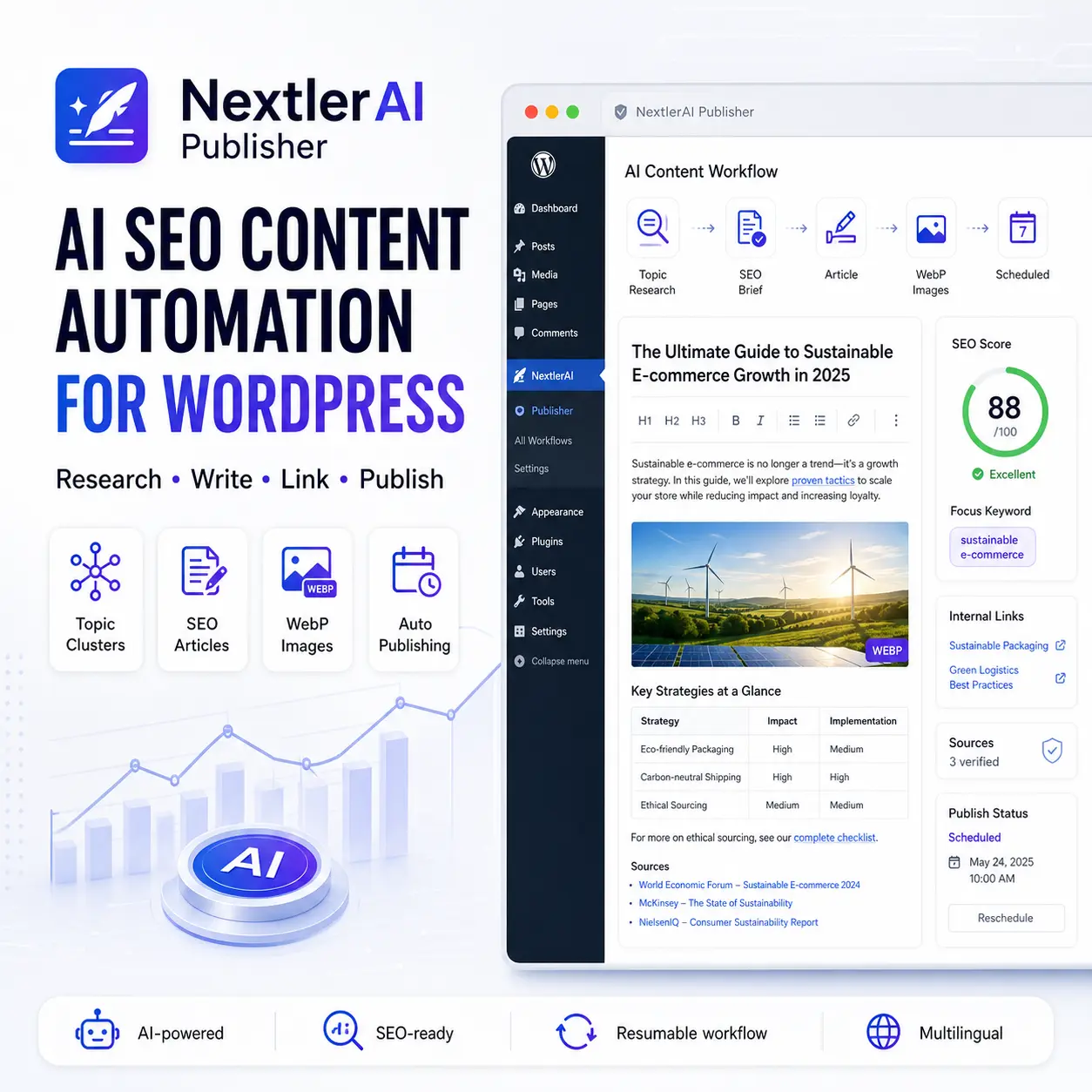
Product capabilities at a glance
Turn WordPress into a professional, automated SEO content engine.
NextlerAI Publisher:
- Generates complete long-form, SEO-focused articles
- Builds AI topic clusters from your website, products and existing content
- Researches Google SERPs, competitors and content gaps
- Uses Google Search Console queries, impressions, CTR and positions
- Creates featured and in-content AI images in WebP format
- Adds contextual internal links to posts, pages and WooCommerce products
- Finds and verifies authoritative external sources
- Writes SEO metadata for SEOPress, Yoast, Rank Math and AIOSEO
- Supports multilingual websites with WPML and Polylang
- Schedules automatic article generation and publishing
- Saves every section and resumes interrupted jobs without restarting the whole article
- Prevents keyword cannibalisation and repeated article structures
- Provides detailed quality, link, image, SEO and indexing reports
Create better content, publish consistently and reduce hours of manual research, writing, formatting, linking and SEO work.
Professional AI Content Production Inside WordPress
NextlerAI Publisher is an advanced WordPress content automation plugin for businesses, agencies, online stores and publishers that want to grow organic visibility without manually researching, planning, writing, formatting and optimising every article.
Unlike a basic AI writer, NextlerAI Publisher does not send one generic prompt and publish the first response. It follows a structured, research-first workflow.
Before writing, the plugin can analyse:
- Existing WordPress posts and pages
- Published WooCommerce products
- Post categories
- Existing keywords and content overlap
- Live Google search results
- Competitor content and headings
- Google Search Console opportunities
- Relevant internal-link destinations
- Search intent, questions and content gaps
- Authoritative external sources
The plugin then creates a detailed content brief, calculates a word budget for every section and plans the article’s structure, modules, links, citations and image positions.
More Than an AI Article Generator
Articles are written section by section instead of through one oversized AI request. Each completed stage is saved, making long-form generation more reliable and easier to resume after temporary API, hosting or rate-limit interruptions.
Depending on the topic and settings, an article can include:
- A useful introduction
- A working jump-link table of contents
- Structured H2 and H3 sections
- Comparison tables
- Step-by-step instructions
- Checklists
- Pros and cons
- Decision criteria
- Practical examples
- Frequently asked questions
- A focused conclusion
- Contextual internal links
- Verified external citations
- A featured image
- Multiple images distributed throughout the content
Professional core elements remain consistent, while outlines and supporting modules vary between articles to avoid repetitive templates.
Built for Real Content Marketing
NextlerAI Publisher helps you:
- Reduce content research and writing time
- Publish consistently
- Build organised topic clusters
- Support products and services with relevant content
- Improve internal-link architecture
- Reduce keyword cannibalisation
- Automate content generation and publication
- Monitor every generated article through detailed reports
- Preserve completed work during temporary generation failures
No plugin can guarantee Google rankings. NextlerAI Publisher instead gives you a professional workflow for producing more comprehensive, structured and search-intent-focused content.
Research-First Article Workflow
Every article begins with research, a professional brief and a section-level content plan. The plugin defines the intended audience, search intent, content angle, required modules, evidence, links and word allocation before writing begins.
AI Topic Cluster Generator
NextlerAI Publisher can analyse your website and automatically generate:
- Topic clusters
- Pillar article ideas
- Supporting article topics
- Primary keywords
- Search intent
- Category suggestions
- Topic priority
- Topic quality scores
You can review topics before adding them to the queue or use an automated workflow.
Resumable Section-by-Section Writing
Long articles are generated as separate sections. Completed sections and images are saved as checkpoints.
If a temporary API or server error occurs, the plugin can continue from the last saved stage instead of discarding the whole article and repeating previously completed work.
Multiple AI Providers
Connect your preferred text-generation provider:
- OpenAI
- Google Gemini
- Anthropic Claude
- xAI Grok
Choose from labelled economy, standard and premium model options or enter a supported custom model ID.
AI Image Generation and WebP Conversion
Create article images with:
- OpenAI image models
- Google Gemini image models
Configure the image model, quality, dimensions, visual style and number of inline images.
The plugin can generate:
- A featured image
- Multiple in-content images
- Topic-relevant ALT text
- Optimised WebP files
Inline images are distributed between relevant article sections instead of being grouped together.
Contextual Internal Linking
The plugin indexes published:
- Posts
- Pages
- WooCommerce products
It then selects suitable same-language internal-link destinations based on topic relevance. Links are placed naturally inside relevant sentences with varied anchor text.
Verified External Sources
NextlerAI Publisher can discover and verify authoritative external sources even without a SERP connection.
You can provide preferred domains in priority order. When Serper.dev is connected, the plugin can also use current Google results to discover topic-specific sources.
Live Google SERP Research
Optional Serper.dev integration adds live research based on:
- Current Google results
- Competitor headings
- Search intent
- People Also Ask questions
- Content gaps
- Relevant source URLs
If live SERP research is unavailable, the plugin can continue using website inventory, product data, Search Console data and independently verified sources.
Google Search Console Integration
Connect Google Search Console to use real search-performance data:
- Queries
- Pages
- Clicks
- Impressions
- CTR
- Average position
Only sufficiently relevant queries are added to an article brief.
The reporting dashboard also identifies:
- Low-CTR opportunities
- Queries ranking in positions 4–20
- Queries ranking in positions 21–30
- Topic-relevant Search Console opportunities
- Historical Search Console snapshots
The plugin also includes Google URL Inspection access for generated posts.
SEO Plugin Integrations
NextlerAI Publisher can write:
- SEO titles
- Meta descriptions
- Focus keywords
- Canonical URLs
- Social metadata
Supported SEO plugins include:
- SEOPress
- Yoast SEO
- Rank Math
- All in One SEO
It does not force duplicate schema output when another SEO or schema plugin already manages structured data.
Multilingual WordPress Support
The plugin detects website languages and integrates with:
- WPML
- Polylang
The selected article language controls:
- Generated content
- Category selection
- Internal-link candidates
- SEO metadata
- Image ALT text
- WordPress language assignment
Intelligent Category Selection
The plugin first searches for a relevant post category in the selected language.
If no suitable category exists and automatic category creation is enabled, it creates a properly formatted post category. WooCommerce product categories and page hierarchy are not incorrectly used as blog categories.
Professional Publishing Automation
Articles can be:
- Generated manually
- Saved as drafts
- Sent for review
- Published immediately
- Generated ahead of publication
- Published on selected weekdays
- Published at specific WordPress-local times
- Limited by a daily generation cap
Configurable Quality Control
The final article is checked for:
- Word count
- Heading structure
- Introduction
- Working table of contents
- Internal links
- External citations
- Images
- Tables
- FAQ
- Conclusion
- Required content modules
- Duplicate sections
- Broken jump links
- Placeholder content
- Clean HTML
Detailed Article Reports
Each generated article can include a report covering:
- Primary keyword
- Search intent
- Search Console queries used
- SERP research status
- Target and actual word count
- Quality score
- Internal and external link totals
- Featured and inline images
- Section word budgets
- Sitemap status
- Google indexing information
- Cannibalisation check status
Sitemap Verification and IndexNow
After publication, the plugin can:
- Check whether the article appears in the configured sitemap
- Recheck the sitemap manually
- Submit the URL through IndexNow
- Store sitemap and inspection results in the article report
1. Install and Activate
In WordPress, open:
Plugins → Add New → Upload Plugin
Upload the NextlerAI Publisher ZIP file, activate it and enter your licence key.
2. Connect a Text AI Provider
Open:
NAI Publisher → Publisher → AI Providers
Choose OpenAI, Google Gemini, Anthropic Claude or xAI Grok.
Enter the provider’s API key, select a model and test the connection.
AI API usage is billed separately by the chosen provider and is not included in the plugin licence.
3. Configure Image Generation
Choose OpenAI or Gemini for image generation and configure:
- Image model
- AI image quality
- Dimensions
- WebP compression quality
- Featured image
- Minimum and maximum inline images
- Preferred visual style
4. Build the Content Inventory
From the dashboard, select:
Rebuild Content Inventory
The plugin indexes published posts, pages and WooCommerce products for topic planning, overlap detection and internal linking.
5. Configure SEO and Links
Set:
- Sitemap URL
- Internal links per article
- Verified external sources per article
- Preferred authoritative domains
- Keyword-overlap protection
- SEO metadata integration
Preferred domains are entered one per line, with the highest-priority domain first.
6. Connect Optional Research Services
For additional research, connect:
- Serper.dev for live Google SERP analysis
- Google Search Console for real queries, impressions, CTR and positions
Both integrations are optional.
7. Generate a Topic Strategy
Open the Topics section and enter a main subject, or allow the AI to infer suitable subjects from your website.
Select:
- Number of clusters
- Topics per cluster
- Language
- Content goal
- Review or automatic workflow
- Minimum topic quality
- Product-link preference
- Search Console opportunities
Review, approve, queue, archive or delete generated topics.
8. Configure Content Quality
Choose:
- Minimum and target word count
- Minimum and maximum content modules
- Brand voice
- Additional instructions
- Quality threshold
- Required article elements
- Image and link requirements
9. Generate a Test Article
Approve and queue one topic, then open:
NAI Publisher → Jobs & Logs
Generate one article as a draft. Review its content, links, images, category, SEO metadata and generation report before enabling automatic publication.
10. Enable Automation
After validating the test article, configure:
- Publishing frequency
- Publication weekdays
- First publication date and time
- Advance generation time
- Posts per publication slot
- Daily safety limit
- Draft, review or automatic publication workflow
Scheduling uses the timezone configured in WordPress.
Business Content Marketing
Create consistent articles around services, customer questions and industry problems. Connect informational content naturally with relevant service and conversion pages.
WooCommerce Stores
Use products and website content to generate:
- Buying guides
- Product comparisons
- Product education
- Troubleshooting articles
- Category-supporting content
- Long-tail keyword articles
Contextual internal links can direct readers to relevant WooCommerce products.
SEO and Web Agencies
Manage client content production inside WordPress:
- Generate topic clusters
- Configure each client’s brand voice
- Connect Search Console
- Create articles in the background
- Send content for review
- Audit every article through detailed reports
Niche Websites and Publishers
Build large topic clusters without manually tracking hundreds of article ideas.
Topic statuses show which items are suggested, approved, queued, generating, completed, failed, conflicting or archived.
Multilingual Websites
Create separate topic clusters and articles in different languages. The plugin keeps categories, internal links, metadata and generated content aligned with the selected language.
Automated Blog Publishing
Prepare an approved topic queue and configure a publishing calendar. NextlerAI Publisher can generate articles in advance and publish them on selected weekdays using the WordPress timezone.
Search Console Content Opportunities
Use real Google performance data to identify:
- High-impression searches
- Low-CTR results
- Pages ranking in positions 4–20
- Queries needing supporting content
- Search terms relevant to a planned article
Product and Service Visibility
Build informational content that supports commercial pages. Product-link preference helps the topic strategy prioritise subjects with natural opportunities to connect readers with relevant products or services.
Customer reviews
This product has no reviews yet.
Reviews
There are no reviews yet.